Showing posts with label Tips & Tricks. Show all posts

How to boot into Safe Mode Alcatel STAR & IDOL

Sunday, October 6, 2013

enter in safe mode alcatel star idol xpop mpop

In this post I will describe how to boot into Safe Mode on Android device Alcatel STAR, IDOL, XPOP, MPOP and others and actually for what it's used.
Мany Windows users know Safe Mode is a place where you can uninstall, install, remove something like Repair center.
So on Android Safe Mode is the same if your phone makes the problem of the nature of force close you need to perform this action.On Safe Mode all third pary apps are disabled and you can uninstall if you think there is a problem on some apps that you installed earlier.After rebooting in normal mode all apps will be restored at normal state.

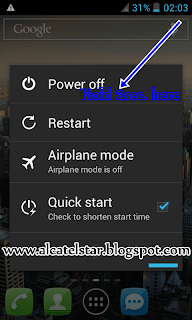
  1. To boot into Safe Mode you need to Hold Power off button on power menu like on screen shot.
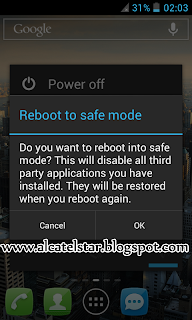
  2. Will be appear new window with message "Do you want to reboot into Safe Mode ? and you need to confirm to reboot into Safe Mode.
  3. When phone booted into Safe Mode at bottom right cornel will display the caption "Safe Mode" this means that you are Safe Mode then I hope you know what you are doing.
reboot into safe mode android alcatel star

boot into safe mode alcatel star idol
safe mode boot android alcatel star idol

How to increase volume of headset or speaker Alcatel STAR, Alcatel IDOL, Alcatel SPOP

Tuesday, July 30, 2013

engineer mode volume increase alcatel idol, star, xpop, spop, tpop, mpop, snap, idol ultra, idol x, scribe easy, scribe x

I want to share my knowledge about how you can increase volume of headset, speaker, loudspeaker etc. after dial the some specific numbers(code) on dialer which enter into "Engineer Mode".
Actually this trick is very easy to do, every even inexperienced can do it without any problems.
This trick is compatible with most Android based Alcatel One Touch models like Alcatel IDOL, Alcatel STAR, Alcatel SPOP, Alcatel IDOL Ultra and others.

So you need to dial these numbers to entering into Enginner Mode*#*#3646633#*#*

Disclaimer: 
We [ALCATELSTAR.BLOGSPOT.COM] not resposible for any damage of your Androd(like bricking, corrupted/broken speakers headphnes) after using this tutorial.
REMEMBER DO IT AT YOUR OWN RISK!!!

Guide:

  1. Dial on dialpad *#*#3646633#*#*.
  2. Slide your finger left twice and enter into option Audio there are several options:
    - Normal mode(here's adjusts the music volume from the speaker)
    - Headset mode(here's for headset volume for Music, FmRadio etc.)
    - Loudspeaker mode(FmRadio, Incoming call volume, Loudspeaker on call etc.)
    - Speech Enhancement(not needed for normal user)
    - Debug Info(not needed for normal user)
    - Speech Logger(not needed normal user)
    - Audio Logger(not needed normal user)
  3. So for example, let's increase the volume for headphones of Music.
  4. Enter into "Headset mode" go to "Type" drop-down menu and select Media(for FmRadio is FMR).
  5. Then go to "Level" and select Level 6(it means that the latter level when the goal of increasing and decreasing the sound of Vol +/- buttons).
  6. Now on "Value is 0~255" almost the end where is located and increase on my Alcatel STAR value is "128" increase with 10, 20, 30 but important remember don't increase to maximum risk to damage the speaker of Phone.
  7. As you see in the end there is another option with value "Max Vol.0~160" on my phone's 140(on other Alcatel phones may be different values) if my value at first option is at maximum you can increase and this but don't touch only in a pinch.
  8. I hope to understand you my long guide of increasing volume on Alcatel phone's.
note: on Normal mode-> again for music is "Media".

Changing hidden theme of Alcael One Touch STAR, IDOL, SPOP

Thursday, July 25, 2013

changing theme alcatel one touch star, idol, spop

I will show you how to change stock white theme of Alcatel STAR,IDOL,SPOP with modification something in the code of the file build.prop.
I discovered this by accident when I fiddling with the phone.

note: Before process you need to have a Root check this or this post for Rooting.

Let's see what is changing after change theme.

Black theme is more good because black color not irritate the eyes also energy saving on Alcatel STAR with AMOLED display.

jrd theme alcatel star, idol, spop
change theme alcatel star, idol, spop
Disclaimer: 
We [ALCATELSTAR.BLOGSPOT.COM] not resposible for any damage of your Androd(like bricking, not turning on ,dead sdcard etc.) after using this tutorial.
                                       REMEMBER DO IT AT YOUR OWN RISK!!!


  1. Download Root browser or other app file manage that allow changing files in whole system.
  2. Open Root browser and go to /custpack and open build.prop for editing and locate the following code: persist.sys.jrdtheme=001 and change to persist.sys.jrdtheme=000 therefore save the changes then reboot phone once.
    (on dual sim version models 003 and 004 also working with more good icons and interface.)
    important: don't confuse build.prop in /system/ there is also such a file build.prop but it is symlink and crash your phone if you edit it you will get Bootloop(phone will not working properly)
  3. That's it Enjoy a your new theme!!!
 

Blogroll

Tags