Showing posts with label Guides. Show all posts

Make scatter file of Alcatel STAR, IDOL, XPOP, MPOP, SPOP and other MTK phones

Monday, August 12, 2013

scatter file alcatel star idol xpop mpop spop

What is scatter file and where it is used ?
Scatter file is the text file with addresses of the blocks of phone.
Scatter file is necessary for Sp Flash Tool for backing up phone or flashing custom Recovery, kernel etc.
I will show to you how can create scatter file from MTK based device specially for Alcatel STAR 6010X.
In this tutorial I using Alcatel One Touch STAR 6010X Android MTK for creating scatter.

Begin

Files required for download:


  • Install ADB drivers you can download from - link
  • Install somewhere MTK Droid tools - link (for some reasons stop for little time your antivirus software)
  1. Launch MTK Droid tools
  2. Plug usb cable and enable USB debugging (if you don't know where is this go to settings->about phone->advanced->debugging and tick usb debugging).
  3. Press Block Map as you can see on screen below
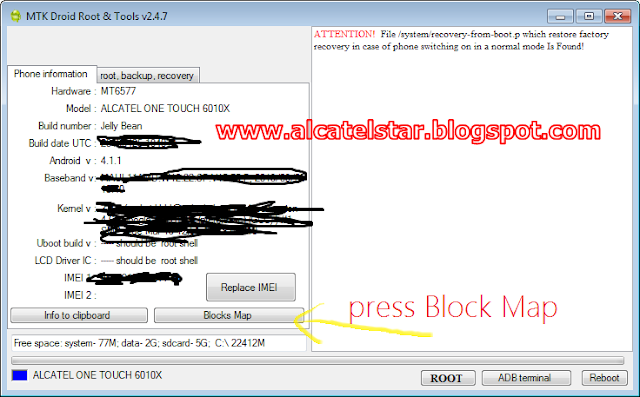
    mtk droid tools scatter create
  4. After will appear next window then press Create scatter file
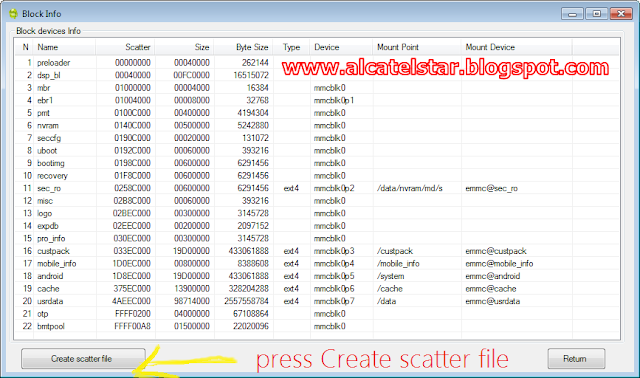
    mtk scatter create
  5. Finally you need to save created scater file to PC under extension txt but don't change name of scatter just save with default generated name I just wrote the name for example reason.Generated name will be like this MT6577_Android_scatter_emmc.txt
how to create scatter file alcatel star idol xpop mpop spop mtk


How to install Flash Player on Alcatel One Touch STAR 6010 & IDOL 6030

Tuesday, July 23, 2013

install flash player alcatel star idol

How to install Adobe Flash Player 11 on Jelly Bean Alcatel One Touch STAR,IDOL and other ICS & Jelly Bean Android devices


Adobe Flash Player for Android all version is no longer available for download and support from the Play Store, but it is still exist on the internet Adobe archive and еach users of Android can download and install Adobe Flash Player on their devices.If you don't know how to install Flash Player on your Alcatel One Touch STAR, IDOL or other based Ice Cream Sandwich & Jelly Bean based Android to learn follow the steps below:

Installation instructions:

  1. Make sure your phone is connected to WiFi.
  2. Download from Adobe site Flash Player 11 - direct download link.
  3. Find downloaded apk with name "install_flash_player_ics.apk" and install.
  4. You can check whether it works just go to http://whatismyflashplayerversion.com
    if you have successfully installed Flash Player will be displayed like next text:
    You have Flash player     11.111 installed.
  5. Final step setting up Flash Player: on more than Android Internet browsers by default Flash Player plugin is disabled so, we need to turn it on:
    If you're using Dolphin browser go to settings->web content->Flash Player and select Always on;
    If you're using Boat browser go to settings->page content settings->Enable flash/plug-ing and select Always on;
    note: Chrome doesn't support Flash Player it used HTML5
    That's it!
 

Blogroll