Showing posts with label Apps. Show all posts

Xposed Framework beautify your phone without modifiying any apk

Sunday, October 6, 2013

xposed framework change your android look easily

What's excatly Xposed Framework ?
It's App that modify your Android User Interface like statusbar tweaks, display tweaks, navigation bar tweaks, phone tweaks, media tweaks, power tweaks, hardware keys tweaks, advanced power menu(I mean reboot to recovery, shutdown, reboot) changing icons, changing colors of statusbar, transparent notification bar, turning capacitive buttons for notifications and many many more awesome modifications & tweaks.

Let's describe in this way:
Xposed Framework app borrows with Xposed Modules.
Framework is heart of operation but Modules is the other major part of the operation.Also Xposed Framework can not operate without Modules and vice versa.
Each Module have different features that developed by different person.

Disclaimer: We(alcatelstar.blogspot.com) or developer of this APP are not responsible for any damage on your phone after installation this APP.
DO IT AT YOUR OWN RISK!!!
I recommend for some reason, please make a full Nandroid backup of your whole system.I think no high risk of hard bricking only soft bricking like bootloop.

How to install Xposed Framework & download Modules:

- first your phone must be Rooted [for rooting check - here and here]
- you need to download Xposed Framework from developer site - here
- Modules you can directly download from Xposed Framework or manual download as first download on PC or on Phone then install like normal app


1. So when you have already on your phone latest Xposed Framework.
2. Install apk file like normal app
3. Then you need to activate/install Xposed Framework:

xposed framework installation instructions

install xposed framework and modules

how to install xposed framework on android

4.As you can see on screen shot you need to reboot your phone to working Xposed Framework.

change statusbar without modification apk

5. After rebooting launch Xposed Framework and go to Modules and you can install any Modules but not all are compatible and working.

how to install modules on xposed framework

6. I tried all Modules but for my Alcatel STAR 6010x only works GravityBox, Xblast Tools and some smalls like Advanced power menu.
But GravityBox have a set of amazing features that will work on most Android phones your phone.
7. Here's the GravityBox Module download from button & install.
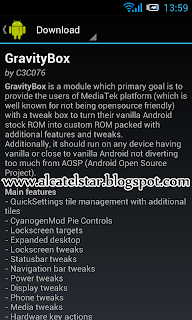
gravitybox module for xposed framework

xblast tools module xposed framework

8. After installation of Module you need and this to activate you will see notification with warning for activation.

modules for xposed framework

9. Now you have installed Xposed Framework & amazing Module GravityBox.Experiment with features inside and that's it like a playing game no any modification on apk:)
note: don't forget to reboot phone after playing with Module to take effect.
note: If you don't like this app you can easily uninstall as you go to Xposed Framework app and go to first option Framework then "Clean up".

for more information visit original source: http://forum.xda-developers.com/showthread.php?t=1574401
developer of Xposed Framework: rovo89

Samsung Galaxy S3 TouchWiz Launcher for Alcatel STAR & IDOL

Friday, September 6, 2013


samsung galaxy s3 launcher for alcatel star idol


Samsung Galaxy S3 Launcher for Alcatel STAR & IDOL

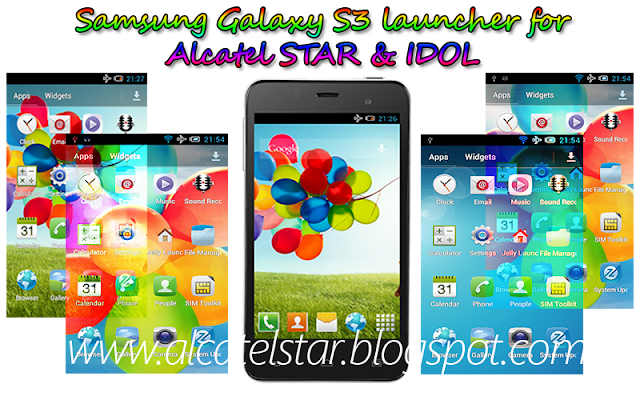
Brilliant Launcher from Samsung Galaxy S3 for Alcatel STAR & IDOL and will work on other Android GB, ICS or JB devices actually launcher is for Samsung Galaxy Y.

Launcher is really beautiful style working smoothly with super visual effects like on Samsung Galaxy S3 device also icons is original stock from Galaxy S3.
Another thing launcher have integrated stock colorful wallapers pack from Samsung Galaxy S3 as you seen on screen shots.

Features of Launcher:
- Shake to switch wallaper
- Desktop transition effects
- App drawer transition effects
- Effect on pressing icons
- Dowloaded apps tab in app drawer
- Themes
and more inside

DISCLAIMER: We(alcatelstar.blogspot.com) or developer of this APP are not responsible for any damage on your phone after installing this APP.DO IT AT YOUR OWN RISK!!!

How to install:

  1. You need to download flashable zip Galaxy S3 launcher from - here and copy to sdcard.
  2. Then enter into CWM or TWRP(I using TWRP because CWM not fully functional for yet).
  3. Next step you need mount system:
    - if you're using CWM recovery->go to mounts and storage look at system and mount;
    - if you're usiing TWRP recovery->go to mount and mount system;
  4. Next step you need to install flashable zip:
    - if you're using CWM recovery->go to install zip from sd->scroll to zip file and press yes;
    - if you're usiing TWRP recovery->go to install->scroll to zip file->then swipe to confirm;
  5. That's it Reboot phone and Enjoy for this great launcher!!! 
Warning: If you do not like this launcher you can easily remove by installing flashable uninstaller via CWM or TWRP recovery.
GalaxyS3 Uninstaller Download from - here 


All credits & thanks to developer - SaM-RoN
original-source 

Battery saver app for one sim versions Alcatel STAR & IDOL

Thursday, August 22, 2013

alcatel star battery saver app
I noticed on Alcatel STAR 6010D(dual sim) attending application called Battery Saver and not exist on my Alcatel STAR 6010X(one sim).
Let me introduce you with Battery Saver application.
Battery saver is very useful app on Alcatel Android phones which lies concealed active in notifications show time remaining on Active use and current Mode.

Battery saver shows time remaining on Active use:
- for Calls
- for Internet
- for Reading
- for Music

You can set battery saver on follow modes: 
- General(Haptic feedback is on and orientation is on brightness level at 30%).
- Optimal(everything's turned off & brightness levet at 20%).
- Sleep(this mod will be turning off all Networks, Wifi, Data connection, Bluetooth, GPS, Auto-sync you can't make a call only set when you go to bed).

One more great features:
You can set when power is lower than 10-20-30-40% to automatically switching specific mode.
Another feature you can for a specified time switching mode e.g. from 22:00 to 06:00.

Some Tips:
A mode is a special setting that changes and affects battery life usage.
General mode Optimal mode and Sleep mode are preset modes used to conserve battery life.These preset modes cannot be edited or deleted.

New modes can be added, customized and easily switched out to fit your user needs.
note: custom modes may not efficiently help extend battery life.


Custom modes can be edited or deleted by long pressing the mode icon.Make sure that the mode has been deactivated and not in use before you deleted it.

DOWNLOAD APP FROM - HERE
INSTALL LIKE NORMAL APP

battery saver alcatel star idol


Blogroll